

Introducing Campus FlexDesk!
A shared, bookable workspace designed to support flexible work styles while ensuring fairness, efficiency, and comfort for all users.
Flexible workspaces are available at the Fennell Campus in the J, I, and EA Wings for employees who do not have a permanent desk at the Fennell Campus, as well as for employees from other campuses working there temporarily. Flexible workspaces are also available at the Stoney Creek Campus for employees who are visiting or do not have a permanent desk at that location.
Employees can now book a workstation, individual room or meeting spaces within Campus FlexDesk through The Archie mobile app or Microsoft Teams.
What is Campus FlexDesk?
Campus FlexDesk is Mohawk College’s workspace booking system, powered by the Archie platform. It allows you to reserve desks, private offices, and meeting rooms in advance of your campus visit, or book them on the spot by scanning room QR codes.
Before You Start
You must be logged in with your Mohawk College SSO (single sign‑on). This should happen easily by clicking the Sign in with Microsoft Azure SSP button.
Make sure you know which campus location and workspace type you need.
If booking a meeting room, confirm:
- Number of attendees
- Equipment needs (monitor, docking station, sit stand desk, etc.)
- Duration of the meeting or time the space is needed
Fennell Campus
EA409 FlexDesk Space (click to view details)
Located at the Fennell Campus on the fourth floor of the EA‑Wing (Joyce Centre for Partnership & Innovation), this bright, open‑concept FlexDesk space includes 18 bookable desks and 3 private meeting rooms . The area features a kitchenette/lunchroom, seasonal patio, central print and waste‑sorting station, and several casual seating areas for informal collaboration. The space benefits from ample natural light and the sustainability features of a zero‑carbon facility.
Washrooms, including a universal washroom, are located down the hall. The space is accessible via stairs or either of the two elevators. Access is controlled by key card, and employees will need their OneCard to enter. A coat closet and lockable daily‑use storage compartments are available.
Like all FlexDesk spaces, EA409 is self‑serve. Please contact the appropriate team directly for printer support, cleanliness/waste needs, or workspace issues.
Desks 1 – 18
Each desk includes 1–2 monitors, a universal docking station, keyboard, and mouse. Select desks have sit/stand capability. Book through the Archie App and use filters to select the setup that best suits your workday. For calls or private meetings, the two conference rooms (EA409A and EA409C) are available.
Meeting room EA409A (up to 4 people)
A small collaboration room for up to 4 people, equipped with a TV, phone, table, chairs, and whiteboard. Intended for short meetings (up to one hour) and primarily for employees using the FlexDesk area. Bookable via Archie or used impromptu when free.
Meeting room EA409B (up to 14 people)
A large conference room for up to 14 people, equipped with a TV, phone, and whiteboard. This room must be booked through the WhereEnCampus system. "https://whereencampus.mohawkcollege.ca/p/RoomSearch"
Meeting room EA409C (up to 6 people)
A medium collaboration room accommodating up to 6 people, equipped with a phone and whiteboard. Designed for short meetings (up to one hour) and primarily for employees using the FlexDesk area. Bookable via Archie or used impromptu when free.
J016 FlexDesk Space (click to view details)
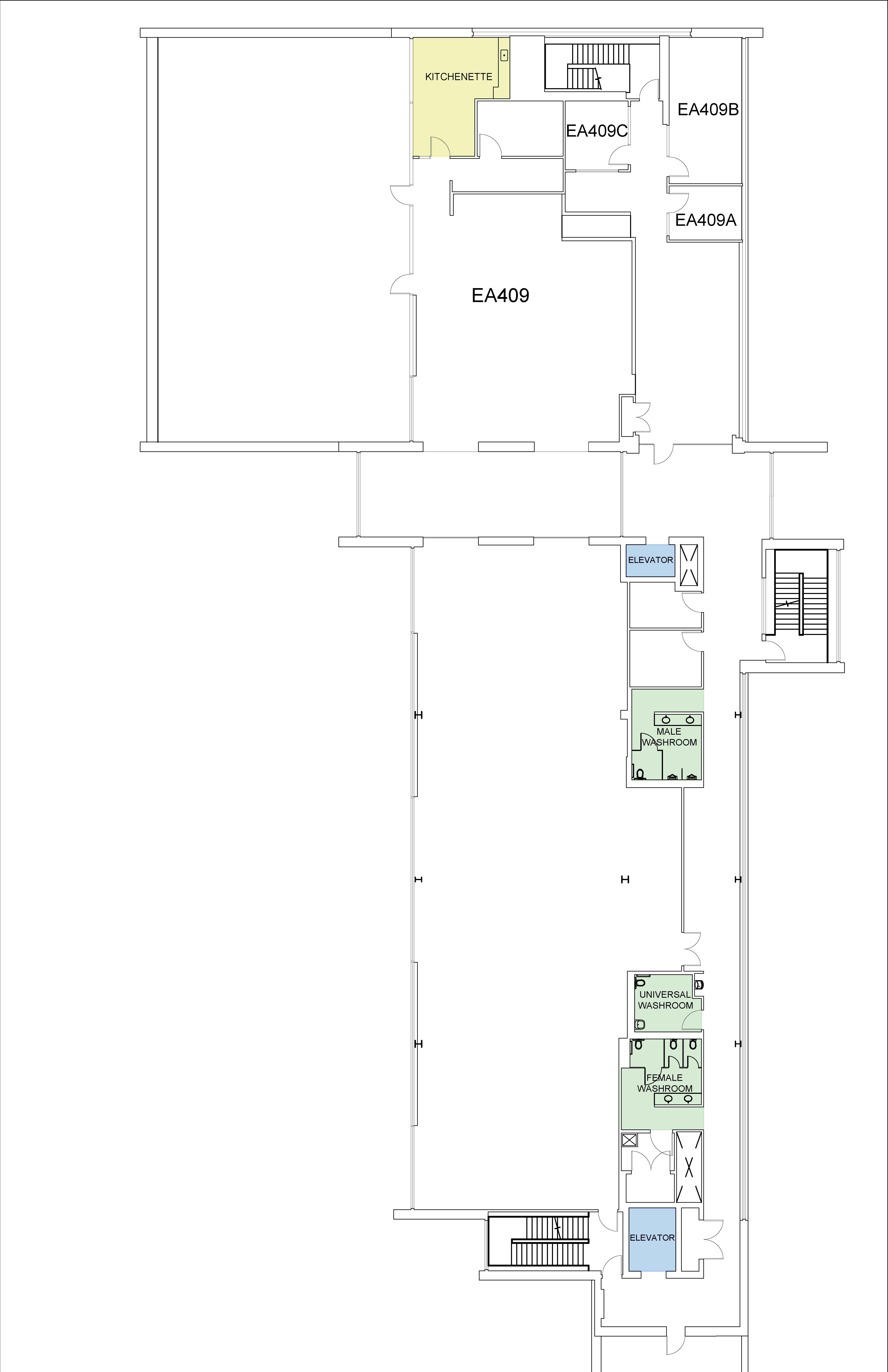
Located on the ground floor of the J‑Wing at the Fennell Campus, this quiet, semi‑private space includes 17 bookable desks and one meeting room. While the space does not have natural light, the layout provides visual privacy through cubicle walls and desk orientation.
A central print and waste‑sorting station is available. Washrooms are located down the hall. The space is accessible via the A‑Wing or J‑Wing elevators or nearby stairs. Entry requires your OneCard, and the door can be opened automatically using the accessible button after swiping.
Coat hooks and plenty of lockable daily storage compartments are provided.
Like all FlexDesk spaces, J016 is self‑serve. Please contact the appropriate team for printer support, cleanliness/waste needs, or workspace issues.
Desks 1 – 17
These semi‑private desks offer a quiet environment ideal for focused work and for employees who need proximity to specific programs or working groups. Each desk includes 1–2 monitors, a universal docking station, keyboard, and mouse, with some featuring sit/stand capability.
Book through the Archie App and use filters to choose the desk that best meets your needs. For virtual meetings or private conversations, the meeting room in J024 is available.
Meeting room J024 (up to 6 people)
A small collaboration room for up to 6 people, suitable for in‑person and virtual meetings. It includes a table, chairs, whiteboards, and a phone. Intended for short meetings and bookable via the Archie App or used impromptu when available.
I105 FlexOffice Space (click to view details)
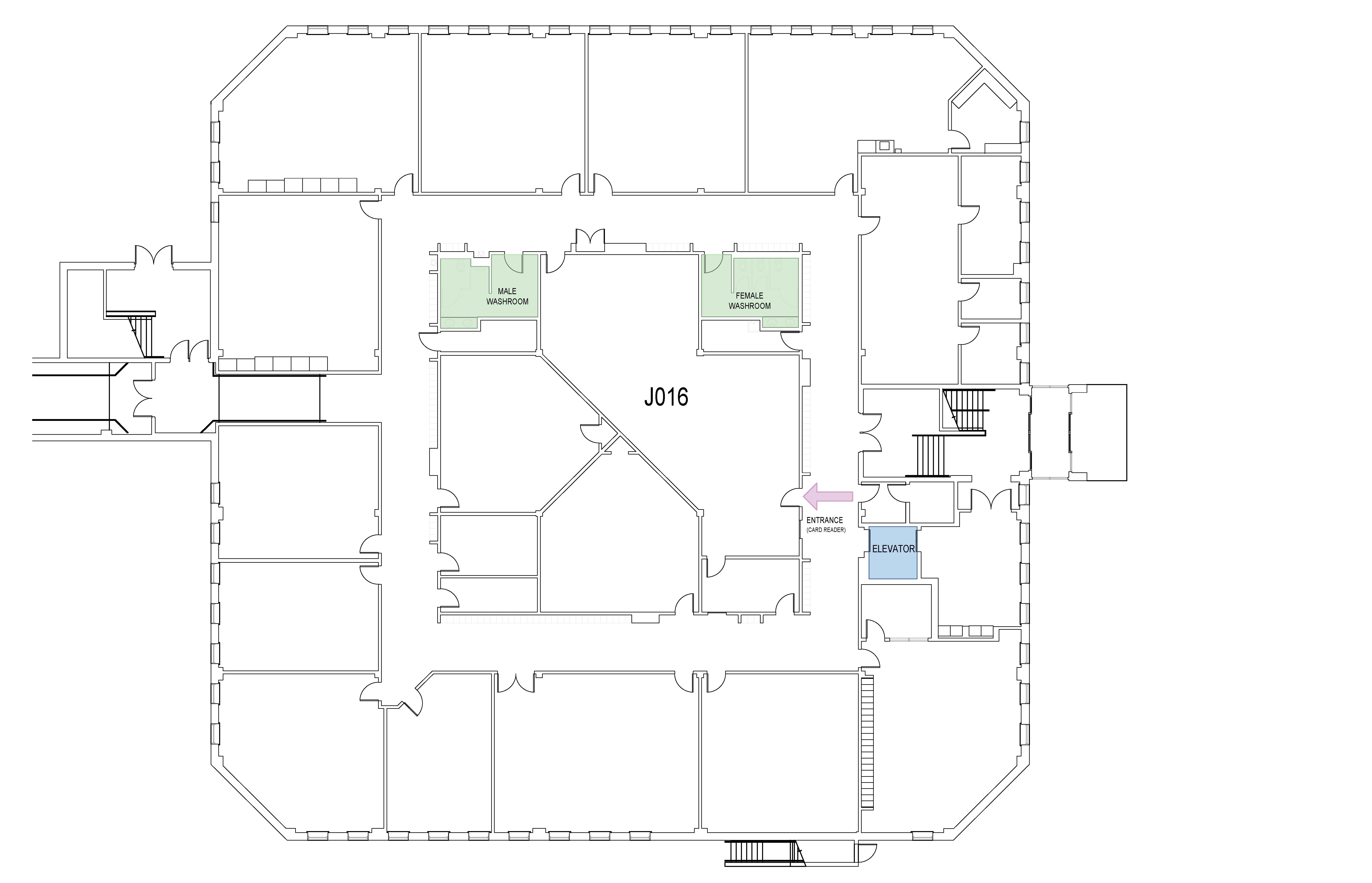
Located on the first floor of the i‑Wing at the Fennell Campus, four bookable private offices are available for employees who need a quiet, enclosed workspace for a full day of virtual meetings, focused work, or confidential 1‑1 conversations.
- Private Office i105a
- Private Office i105b
- Private Office i105c
- Private Office i105d
Due to safety and access protocols, these offices must be booked for the entire day. Each office includes a desk, two chairs, two monitors, universal docking station, keyboard, mouse, and a lockable daily storage compartment.
Washrooms are located down the hall, and a central print and waste‑sorting station is nearby (near the Canoe display). The space is accessible by stairs or elevator.
Access keys must be signed out from the Traka Box (located in front of the Security Office in C‑Wing) at the start of the day and returned before leaving. Your OneCard is required to access the Traka system.
Like all FlexDesk spaces, i105 offices are self‑serve. Please contact the appropriate team for printer support, cleanliness/waste needs, or workspace issues.
Stoney Creek Campus
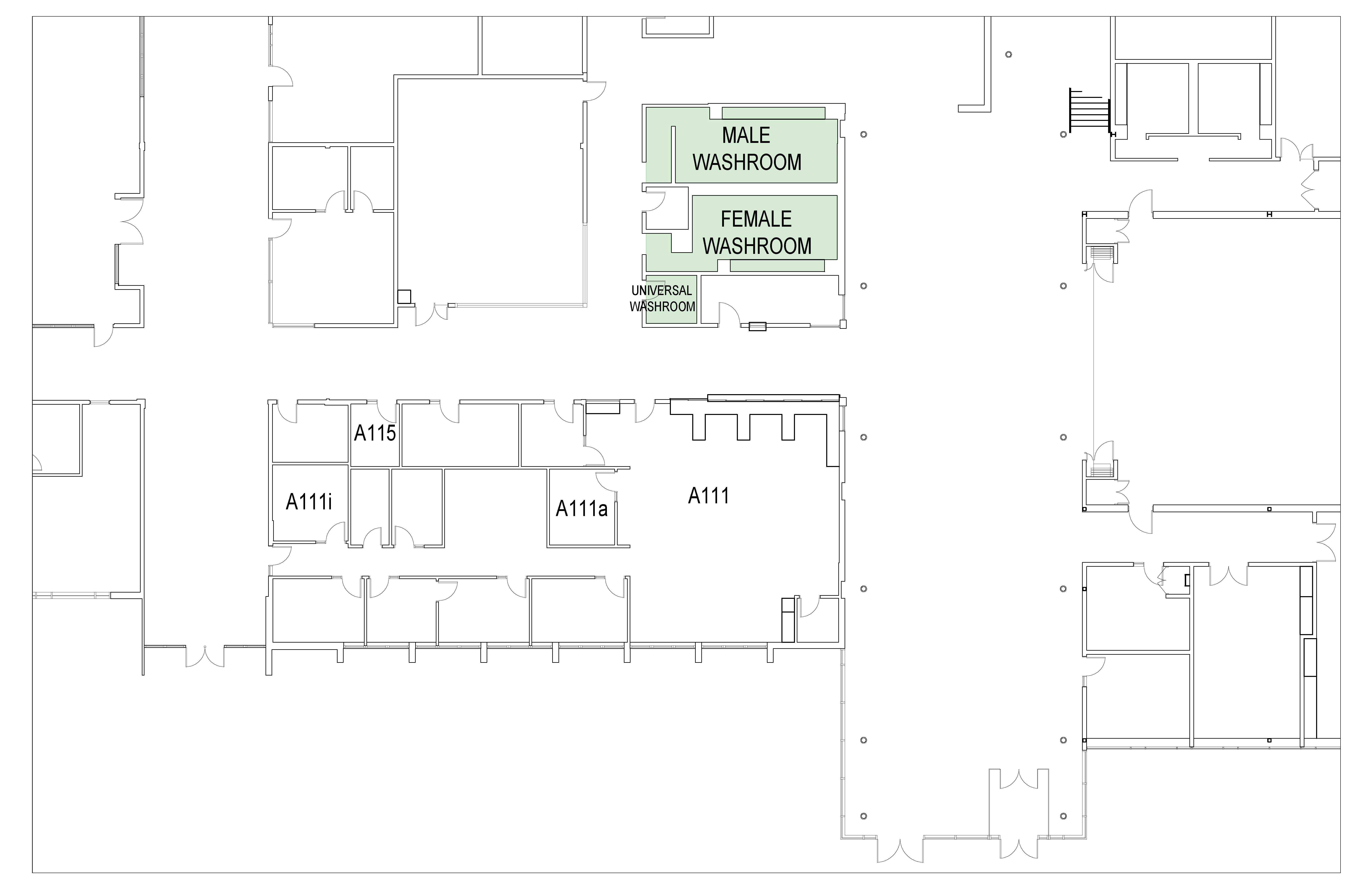
A111 FlexDesk Space (click to view details)
Located in the main corridor of A-Wing at the Stoney Creek campus, two bookable workstations and 3 private offices.
- Desks 1 – 2
- Private Office A111a
- Private Office A111i
- Private Office A115
A central print and waste‑sorting station is available. Washrooms are located down the hall. Entry requires your OneCard, and the door can be opened automatically using the accessible button after swiping.
The semi‑private desks offer a quiet environment ideal for focused work and for employees who need proximity to specific programs or working groups. Each desk includes 2 monitors, a universal docking station, keyboard, and mouse, with some featuring sit/stand capability.
The private offices A111a, A111i and A115 are available for employees who need a quiet, enclosed workspace for a full day of virtual meetings, focused work, or confidential 1‑1 conversations. Each office provides 2 monitors, universal docking station, keyboard and mouse.
Book through the Archie App and use filters to choose the desk that best meets your needs.
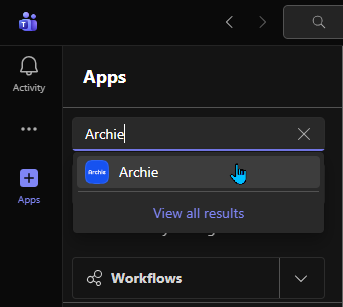
Option A — Teams Integration
- Open Microsoft Teams
- Search for "Archie"
- Open the app and sign in using SSO
Option B — Web Browser
- Visit our Campus FlexDesk portal
- Sign in with SSO
Option C — Mobile App
iPhone (Apple App Store):
- Open the App Store
- Search Archie – Workspace Booking
- Download the app
- Open it and choose Sign in with SSO
- Select Mohawk College from the list (or type it in)
Android (Google Play Store):
- Open Google Play
- Search Archie – Workspace Booking
- Install the app
- Open it and log in via SSO
What is Campus FlexDesk?
Campus FlexDesk is a shared, bookable workspace designed to support flexible work styles while ensuring fairness, efficiency, and comfort for all users.
How do I book a desk?
You must book a workstation before using it. You can book through:
- The Archie – Campus FlexDesk website: Campus FlexDesk
- The Archie mobile app (recommended for phones)
- Microsoft Teams on your computer, just add the app to your teams
- The QR code located on each desk
Booking Policies
- No recurring bookings
- Desks can be reserved up to two weeks in advance.
- You’ll receive an email reminder one hour before your booking
- Your booking must be confirmed through:
- The confirmation link in the reminder email
- The Archie app
- Teams (Reservations page)
- If not confirmed within 15 minutes of the start time, the desk is released for others to use
How do I know if a desk is available?
- Go to Booking management → Book a desk
- Choose your date and time
- Look for the desk you want and try to book it
What you’ll see:
If the desk is available → you’ll be able to click “Book” and proceed normally
If the desk is NOT available → you’ll see a “Book another time” option (instead of booking it)
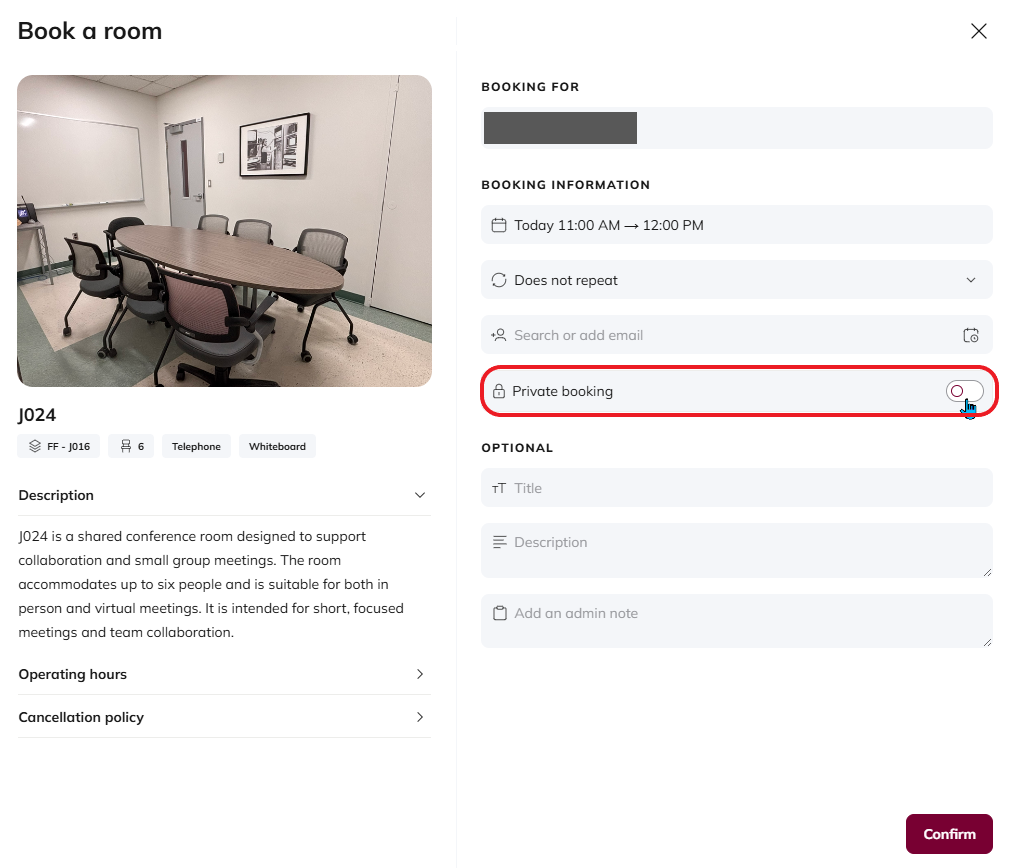
How do I make my booking private from others?
When booking the space, there is a selection to make the booking private. Please be sure to click this before confirming your booking.
How do I access the i-105 rooms?
Access to office i105A-D is provided via a key stored in the Traka electronic key box located in front of the Security Office in C-Wing (C103).
Instructions on how to access the i105 meeting rooms are included in your booking confirmation email.
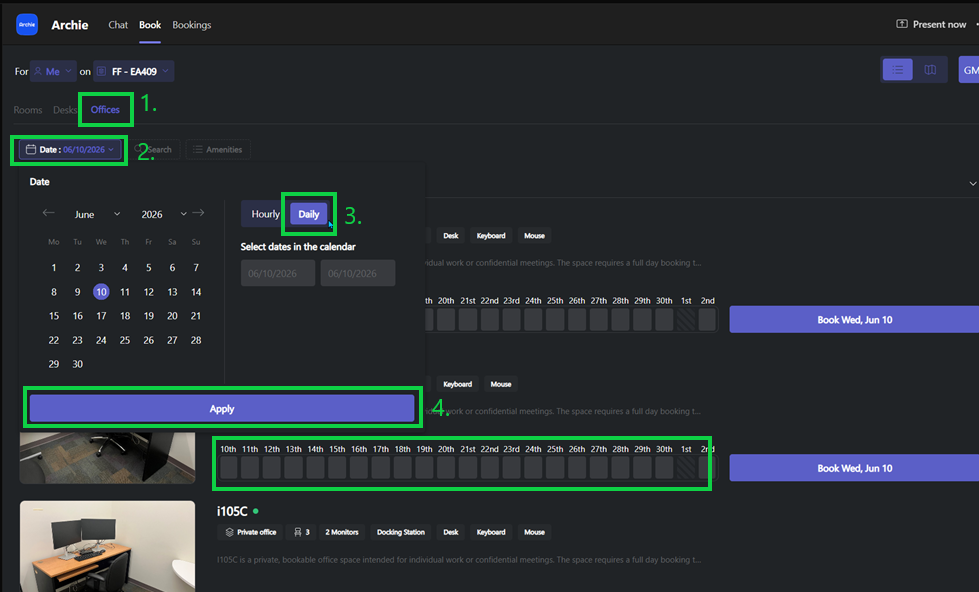
Why can’t I book certain offices, or why am I seeing the wrong rooms in the booking system?
This may be due to the booking preference (Daily vs. Hourly) selected in the system.
- I105 offices (I-Wing) require full-day (Daily) bookings only due to Traka key-controlled access
- A111 offices (SC-A111) must be booked using the Hourly booking preference
If the wrong booking preference is selected, you may notice:
- The room list changes unexpectedly (e.g., switching from SC-A111 to I-Wing offices)
- You’re unable to book a room or see the correct availability
How to fix it:
- Select the correct space (e.g., Offices tab)
- Open the Date/Time picker
- Choose the appropriate booking type:
- Daily → for I105 offices
- Hourly → for A111 offices
- Click Apply
How does meeting room bookings work in Campus FlexDesk?
The meeting rooms:
- Are intended for short meetings only
- Cannot be booked as an all-day private office (there are private offices available for booking)
- Is booked the same way desks are (Archie, Teams, QR code)
For larger or longer (full day) meetings, use the campus booking system:
https://whereencampus.mohawkcollege.ca/p/home
Where do I store personal items?
Cabinets are provided for temporary storage.
- Lock your items while away from the desk
- Keys must stay in the cabinet when you leave for the day
- All items must be removed at day’s end
What are my responsibilities for cleaning?
This is a self-service space. You are responsible for:
- Leaving your workspace clean
- Placing garbage in the central waste station in the main corridor
- Wiping down your station, supplies are located at the entrance
What should I do about noise?
To maintain a productive shared environment:
- Use headsets for all audio
- Keep conversations low
- Move calls or discussions to the meeting room when needed
How do I report issues?
For workstation issues, cleanliness concerns, or space improvements: 📧 CampusFlexDesk [at] mohawkcollege.ca (CampusFlexDesk[at]mohawkcollege[dot]ca)
For facilities-related concerns: 📧 maintenance [at] mohawkcollege.ca (Maintenance[at]mohawkcollege[dot]ca)
For technical support: 📧 helpdesk [at] mohawkcollege.ca (Helpdesk[at]mohawkcollege[dot]ca)
What if I lose or find something?
Please contact Security for all lost-and-found matters.
Can I provide feedback about the space?
Yes! Your input helps us improve. 📧 CampusFlexDesk [at] mohawkcollege.ca (CampusFlexDesk[at]mohawkcollege[dot]ca)
What are we doing about other campuses? - Several spaces at Stoney Creek are currently available to be booked in the same manner as those at Fennell. The Facility Services team is working to identify flexible workspaces at the IAHS and at the Airport campus. Please stay tuned!
Please note: Other meeting spaces and rooms will continue to be booked through WhereEnCampus.
For booking assistance, technical issues, or space-related questions, please contact CampusFlexDesk [at] mohawkcollege.ca (CampusFlexDesk[at]mohawkcollege[dot]ca)
