

Accessible Learning Services at Mohawk College has implemented a new system for requesting and managing accommodations called Accommodate. Within this new system you can:
- Request your accommodations for the semester
- Request new accommodations not on your Accommodation Letter
- Submit meeting requests
- Book to write quizzes/tests/exams with The Mohawk Testing Centre
For more information and instructions regarding the Accommodate portal, including login instructions and accessing your Accommodation Letter, please visit Accommodate Instructions for Students.
Booking Your Class Test and/or Exam
These processes must be followed at least 7 days in advance of the test date and time. This is the only way to guarantee students receive testing accommodations.
For students in the BScN or RPN to BScN programs, please email alternativetesting.iahs [at] mohawkcollege.ca (alternativetesting[dot]iahs[at]mohawkcollege[dot]ca) for test booking instructions.
Online Test Accommodations
If you require accommodations for an online test, please communicate directly with your instructor and request that the testing accommodations be applied at least 7 days in advance of the test date and time. All approved testing accommodations can be found on your Accommodation Letter which should have been provided to your instructor prior to requesting accommodations.
If you require accommodations in the online environment that the online proctoring tool and your instructor is not able provide, please book your test through the testing portal on Accommodate.
In-Person Test Accommodations
If you require accommodations for an in-class and in-person test, tests must be booked at least 7 days in advance of the test date and time through the test booking portal on Accommodate.
How to Book:
You must have the following information prior to booking:
Student ID, instructor name, course code, course name, test delivery, date and time the test is being administered in class, test room location and duration
- Login to your Accommodate account
- Click the “Test Booking” tab on the left-hand side
- If the Test Booking tab does not appear, please ensure you have submitted your Accommodation Renewal. For instructions, please visit the Accessible Learning Service’s website.

- Click “New Booking Request”

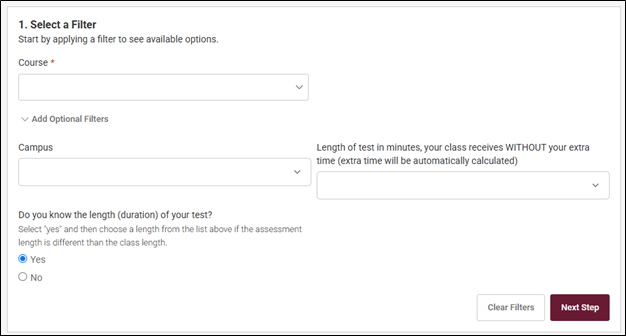
- Select your course from the dropdown menu
- If preferred, click “Add Optional Filters” in order to limit the slot options to a specific campus and/or duration.
- If you are aware of the duration of the test, click ‘Yes’ and indicate the duration WITHOUT your extra time. This will also be confirmed by your instructor.
- Click 'Next Step'
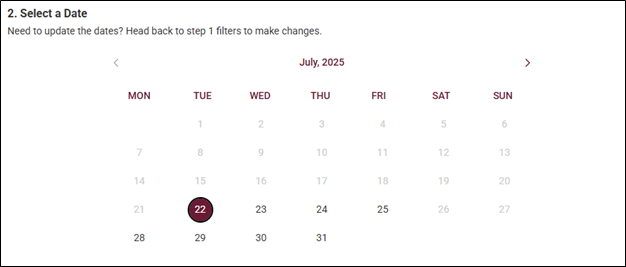
6. Use the calendar to select the date of your test
a. Only available dates will be clickable. Test bookings must be submitted at least 7 days in advance of the test date and time.
7. Once a date has been clicked, use the ‘Select a Space’ option to book a specific time and select the campus where your class is writing
a. The Testing Centre is open from 8:00am to 8:00pm, for students writing at the same date/time as the class. If an evening start time is not appearing, please choose the latest slot available. Based on your duration, the end time will need to be 8:00pm.
b. Please ensure you are booking at the same time as your class. If you are not writing at the same time as your class, please ensure this has been pre-approved by your instructor.
c. If writing on an alternate date, this must be written within Testing Centre business hours of 8:30am-4:30pm, Monday to Friday.
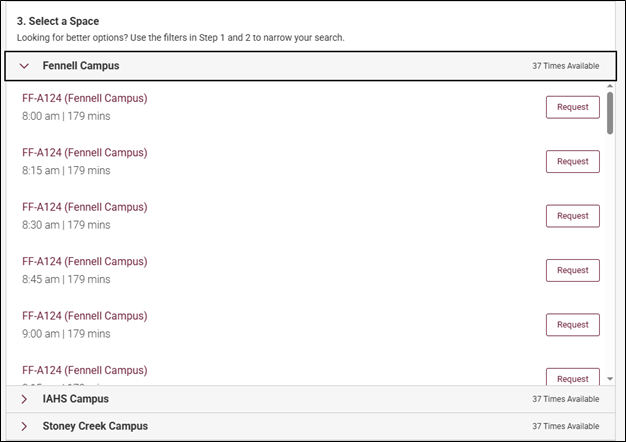
- Click ‘Request’ and complete your test request by filling in the remaining information.
- Ensure to click ‘Submit Request’
Please be advised you will receive a confirmation email to your Mohawk email address upon submitting your test request. If you do not receive this email, or do not see you test request in Accommodate, please re-submit your test request.
If you require any changes to your booking, please reach out to your campus Testing Centre at least 3 days prior to your test date.
Fennell: alternativetesting.fennell [at] mohawkcollege.ca (alternativetesting[dot]fennell[at]mohawkcollege[dot]ca)
IAHS: alternativetesting.iahs [at] mohawkcollege.ca (alternativetesting[dot]iahs[at]mohawkcollege[dot]ca)
Stoney Creek: alternativetesting.stoneycreek [at] mohawkcollege.ca (alternativetesting[dot]stoneycreek[at]mohawkcollege[dot]ca)
Please feel free to contact your Campus Testing Centre if you have any questions.
