

Faculty Instructions for Test Submission - Accommodate

Accessible Learning Services (ALS) and the Mohawk Testing Centre are excited to announce the launch of Symplicity Accommodate – a new web-based platform to service faculty, staff and registered students with accommodations.  Faculty are able to access Accommodate to review accommodated test booking requests (see below for instructions). 

Access to this system will be available through Mohawk College Single Sign-On to all students who are registered with the ALS office as well as to all faculty members.  Visit the Accommodate Portal.

Accommodate brings many benefits to our college community.  ALS features that will benefit Faculty include: 

  • 24-hour secure access to student accommodations through the Accommodate portal
  • Students send notification of Accommodation Letters to faculty directly through the Accommodate portal
  • Accommodation letters will no longer be sent by email keeping faculty email inboxes clear
  • Accommodations will be listed under each student by course for easy retrieval

For more information and instructions on these processes, please visit the Accessible Learning Services website.

Download a resource document for FACULTY facilitation student accommodations (PDF, 109kb) for online courses.

Accommodated Testing

Tests that are administered to students with testing accommodations (CAAP or Accommodation Letter)

Online Testing Accommodations

Students have been instructed to communicate directly with their instructor and request any testing accommodation required for online tests. All approved testing accommodations can be found on the student’s Accommodation Letter which should have been provided to the instructor prior to requesting accommodations. If you require a copy a student’s Accommodation Letter, please email the student.

For information on how to add extra time through MyCanvas, please visit the Canvas Community website

In-Person Testing Accommodations

If a student requires testing accommodations for an in-class and in-person test, the student must book 7 days in advance through the test booking portal on Accommodate. The system will forward the request to the faculty and require tests to be delivered, electronically at least 72 hours in advance.  If you require a copy a student’s Accommodation Letter, please email the student.

Please note:

  • Only tests delivered to the class, in-person, will be accommodated on-campus. For any in-person test, students will require at least 7 days notice in order to book their accommodated tests. An advance schedule of all term tests, would be beneficial.
  • As per our policy, all accommodated tests must be booked at least 7 days in advance. If a short-term booking can be accommodated (less than 7 days), students are advised to notify their instructor of this late request.
  • If a student books a test on a different date and/or time than their scheduled class test, the student is responsible for receiving permission from their instructor.


Please review the following process if your student(s) require accommodated testing:

  1. Student is to provide their instructor with their Accommodation Letter prior to booking a testing appointment
  2. At the beginning of the semester remind students to book their tests seven days in advance. Students should refer to the course outline for dates of midterms and exams.
  3. Remind students to book their test through their Accommodate account 7 days in advance.

Please note that not all students with testing accommodations choose to write their tests in the Testing Centre.

  1. A testing request (email) will be sent to your (the faculty members) Mohawk email account
  2. Please complete the testing information and provide the test in Accommodate a minimum of 3 business days in advance
  3. You must include your full contact information at the time of the test in the instance the student has any questions or if the student is eligible for clarification based on their Accommodation Letter

If the test is not available in advance of the student’s appointment, the following protocol is in place:

3 business days in advance: Faculty will receive an email reminder

2 business days in advance: Faculty will receive an email reminder and phone call

1 business day in advance: Faculty will be contacted & Associate Dean will be notified

Please note:  If a short-term booking can be accommodated by the Testing Centre (less than 7 days), students are advised to notify their instructor of this late request. 

The online booking system will not permit students to book their test less than 7 days in advance.  If a student requires a test booking less than seven days in advance, the student may choose to book on an alternate date.  If this is the case, the student is required to contact the instructor for permission prior to booking their test on a different date and/or time than their scheduled class test.

Submitting Testing Information through Accommodate

  1. Login to your Accommodate account
  2. On the homepage, click the course(s) under ‘Test Room Bookings to Review’
  3. On the student’s test booking, click ‘Review’
    1. Please note, the ‘Approved’ icon will appear as this has been approved by the Testing Centre, not the instructor.
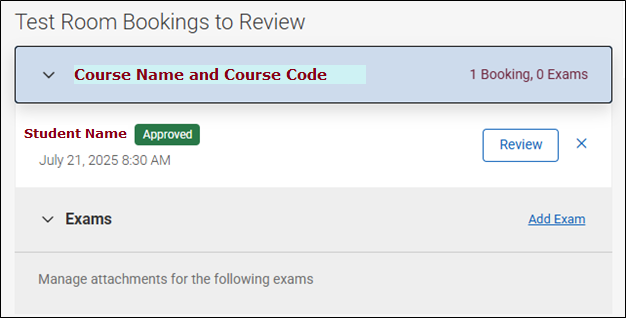
  4. Review the student’s test booking and fill out the required fields
    1. If there are any specific software/programs required, please inform the Testing Centre as soon as possible.
    2. We recommend reviewing each individual student request, rather than completing the ‘Exam’ upload feature, as students often request alternate times and/or leave notes or requests for the faculty.
  5. Upload test/exam (if applicable)
  6. Ensure to click ‘Save’ once all fields have been completed
    1. If you have multiple bookings to review, you can use the ‘Previous’ and/or ‘Next’ buttons to navigate between the bookings
    2. Alternatively, ‘Return to Home’ will lead you back to the homepage

  7. Once completed, you can choose to dismiss the request from your homepage view by clicking the ‘X’ beside the test room booking
    1. Please note, once dismissed, the request will not appear on the homepage moving forward. You will continue to receive notifications on the test booking if adjusted and are able to still access the test booking from the ‘Courses’ page if needed.  

Alternatively, test bookings can still be accessed from the ‘Courses’ tab:

  1. Navigate to ‘Courses’ on the left-hand side
  2. Select the course title
  3. Select the Test Booking tab across the top
  4. Select Approved
  5. Click on the student's name
  6. Fill out required fields
    • If there are any specific software/programs required, please inform the Testing Centre as soon as possible.
  7. Upload test/exam (if applicable)
  8. Ensure to click "Submit" once all fields have been completed

Please feel free to contact your Campus Testing Centre if you have any questions:

Fennell: alternativetesting.fennell [at] mohawkcollege.ca (alternativetesting[dot]fennell[at]mohawkcollege[dot]ca)

IAHS: alternativetesting.iahs [at] mohawkcollege.ca (alternativetesting[dot]iahs[at]mohawkcollege[dot]ca)

Stoney Creek: alternativetesting.stoneycreek [at] mohawkcollege.ca (alternativetesting[dot]stoneycreek[at]mohawkcollege[dot]ca)